
- New levels are added to the game every two weeks. If you keep your game up to date, you can play the newest levels.
- You can tap the link below, then tap the "Update" button to update the game to the latest version.
Royal Kingdom on the App Store - If you see the "Open" button instead of the "Update," you can follow the steps below to update the game:
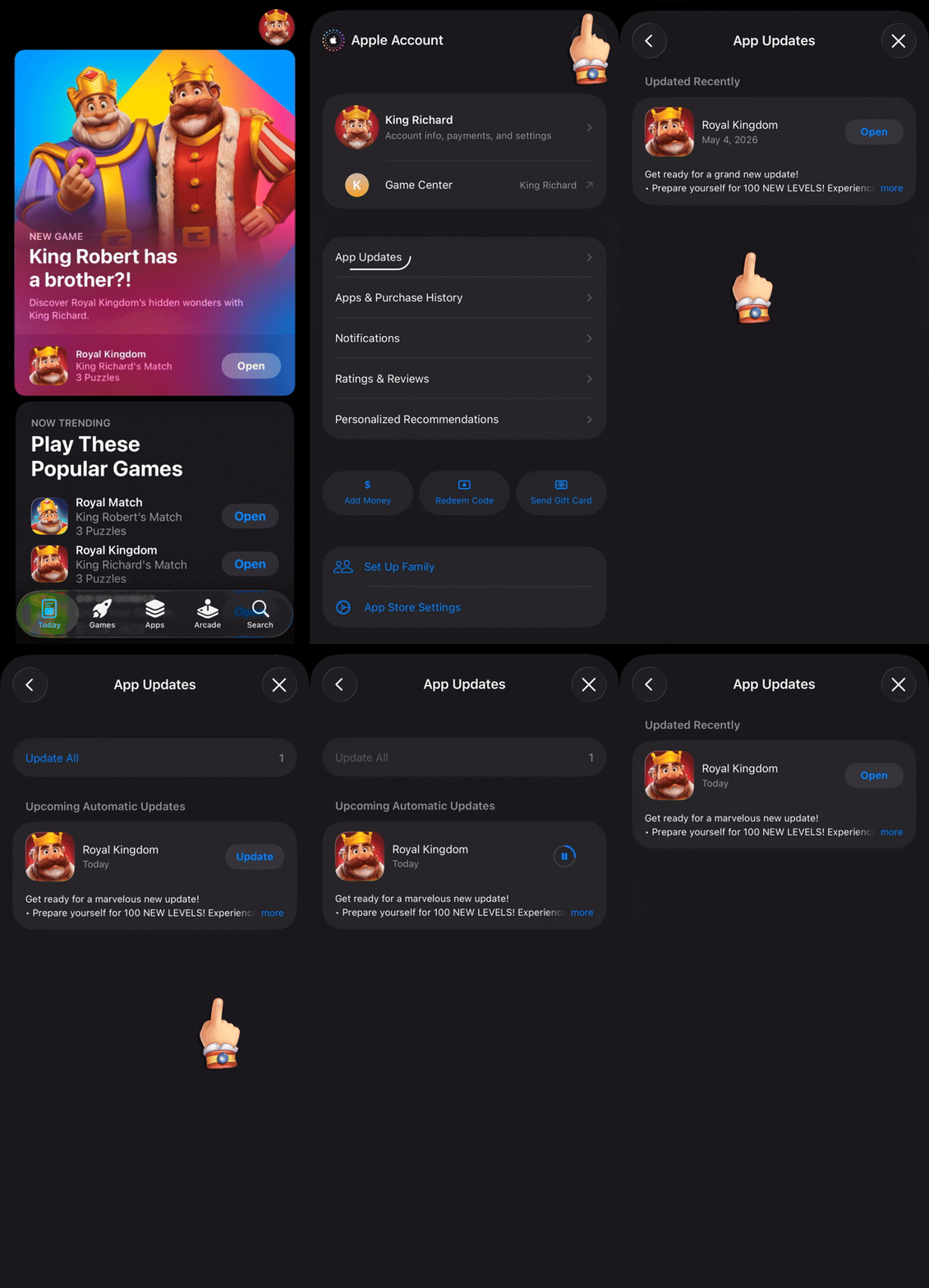
- Open the App Store
- Tap your profile photo in the top-right corner of the screen
- Swipe down the screen to refresh the page
- If you are using iOS 26.4 or later, please open the "Updates" section, then swipe down.
- Tap the "Update" button next to Royal Kingdom
- If there aren't any updates available for Royal Kingdom, you won't see the Royal Kingdom icon in the list
- Here is a guide showing these steps:
- If the "Update" button still doesn't appear after these steps, it's better to try these steps again after restarting your device.
New Levels
Last Updated: 1d